【SWIFT】ぷよぷよとかテトリスとかの落ちものパズルゲーム、UIImageViewの配列定義など
2016/05/18

Contents
swiftでの落ちものゲームのプログラミングは配列処理を使う
swiftで落ちものパズルゲームを作ろうと思ったんですが、そうすると画像をたくさん表示する必要があります。
で、例えば15かける20くらいのマス目を配列宣言しておいて、UIImageViewも同様に配列宣言しておけばいいんじゃないかと思って以下のように宣言したのですが、どうも良くないみたいです。
var doneView: [[UIImageView]] = [[UIImageView]](count: 15, repeatedValue: [UIImageView](count: 20, repeatedValue: UIImageView()))
これで配列宣言しておいて、実際の中身を例えば1.png1という画像ファイルをアイコンとして全てのマス目に表示させようとしてみたら、最後のdoneView[14][19]のマス目にしか画像が表示されない。
        for i in 0...14 {
            for j in 0...19 {
                doneView[i][j].frame = CGRectMake(cellSize*CGFloat(i), cellSize*CGFloat(j), cellSize, cellSize)
                doneView[i][j].image = UIImage(named: "1.png")
                self.view.addSubview(doneView[i][j])
            }
        }
doneView[i][j]という形式で、全てのマス目に対応してUiImageViewが作成されたと思ったのですが、どうも配列宣言のやり方がまずいか、もしくはUIImageViewは配列で宣言しないほうがいいか、どちらかかなあとか考えています。
やっぱタグでやったほうがいいのでしょうな。
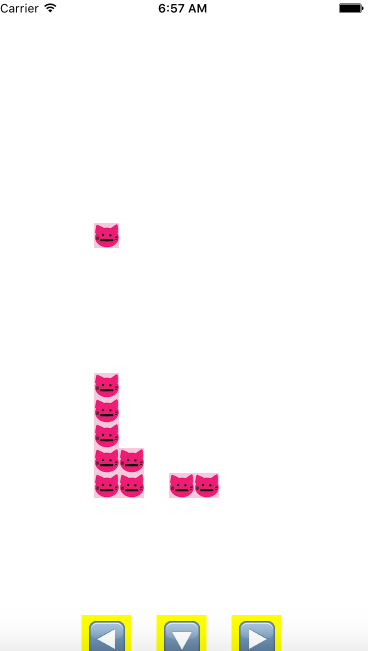
というわけで、左を押すと左に行く、右も同様、下だと落ちる速度が速くなる、落ちるアイコンは1個のみ、という条件のみ設定して、まだ列が揃ったり同じ色が揃ったりすると消える、みたいな作りかけの落ちもの状況のソースコードを以下のようにアップします。
落ちる速度はインターバル0.8にして、したを押すと0.1になる。
境界状況に応じてアイコンが積み重なる。
左とか右を押しっぱなしにしている間はその方向に行くためのタイマーを別途用意する、タグを全ての行列に設定しておいて、値に応じてアイコン表示したりしなかったりするみたいな点がポイントだったでしょうか。
まあ説明は長くなるので、そのうち書くかもしれませんが今はソースコードだけ。
試行錯誤した点も残そうと思って、余計なコードとかコメントも残ったままです。
import UIKit

class ViewController: UIViewController {

    var cells: [[Int]] = [[Int]](count: 15, repeatedValue: [Int](count: 20, repeatedValue: 0))
    let leftButton = UIButton()
    let rightButton = UIButton()
    let downButton = UIButton()
    var cellSize: CGFloat = 0
    var cellView = UIImageView()

    let screenSize = UIScreen.mainScreen().bounds.size
    var tagDig: [[Int]] = [[Int]](count: 15, repeatedValue: [Int](count: 20, repeatedValue: 0))
    //var period = 0.5
    var xPos: Int = 0
    var yPos: Int = 0

    var timer: NSTimer!
    var timerL: NSTimer!
    var timerR: NSTimer!

    override func viewDidLoad() {
        super.viewDidLoad()
        // Do any additional setup after loading the view, typically from a nib.

        setTimer()

        cellSize = screenSize.width/15
        xPos = 4
        yPos = 0
        cellView.frame = CGRectMake(cellSize*CGFloat(xPos), cellSize*CGFloat(yPos), cellSize, cellSize)
        cells[xPos][yPos] = 1
        cellView.image = UIImage(named: "1.png")
        self.view.addSubview(cellView)

        var tagTmp = 1
        for i in 0...14 {
            for j in 0...19 {
                let doneView = UIImageView()
                doneView.frame = CGRectMake(cellSize*CGFloat(i), cellSize*CGFloat(j), cellSize, cellSize)
                doneView.image = UIImage(named: "0.png")
                doneView.tag = tagTmp
                tagDig[i][j] = tagTmp
                self.view.addSubview(doneView)
                tagTmp++
            }
        }

        /*
        doneView[0][0].frame = CGRectMake(cellSize*CGFloat(0), cellSize*CGFloat(0), cellSize, cellSize)
        doneView[0][0].image = UIImage(named: "1.png")
        view.addSubview(doneView[0][0])


        for i in 0...14 {
            for j in 0...19 {
                doneView[i][j].frame = CGRectMake(cellSize*CGFloat(i), cellSize*CGFloat(j), cellSize, cellSize)
                doneView[i][j].image = UIImage(named: "1.png")
                self.view.addSubview(doneView[i][j])
            }
        }
        */


        leftButton.frame = CGRectMake(screenSize.width/2-CGFloat(cellSize*4), screenSize.height-CGFloat(cellSize*2), CGFloat(cellSize*2), CGFloat(cellSize*2))
        leftButton.setTitle("◀️", forState: .Normal)
        leftButton.titleLabel!.font = UIFont.systemFontOfSize(40)
        leftButton.backgroundColor = UIColor.yellowColor()
        leftButton.addTarget(self, action: "leftPush", forControlEvents: .TouchDown)
        leftButton.addTarget(self, action: "leftPush2", forControlEvents: .TouchUpInside)
        leftButton.addTarget(self, action: "leftPush2", forControlEvents: .TouchUpOutside)
        self.view.addSubview(leftButton)

        rightButton.frame = CGRectMake(screenSize.width/2+CGFloat(cellSize*2), screenSize.height-CGFloat(cellSize*2), CGFloat(cellSize*2), CGFloat(cellSize*2))
        rightButton.setTitle("▶️", forState: .Normal)
        rightButton.titleLabel!.font = UIFont.systemFontOfSize(40)
        rightButton.backgroundColor = UIColor.yellowColor()
        rightButton.addTarget(self, action: "rightPush", forControlEvents: .TouchDown)
        rightButton.addTarget(self, action: "rightPush2", forControlEvents: .TouchUpInside)
        rightButton.addTarget(self, action: "rightPush2", forControlEvents: .TouchUpOutside)
        self.view.addSubview(rightButton)

        downButton.frame = CGRectMake(screenSize.width/2-CGFloat(cellSize), screenSize.height-CGFloat(cellSize*2), CGFloat(cellSize*2), CGFloat(cellSize*2))
        downButton.setTitle("🔽", forState: .Normal)
        downButton.titleLabel!.font = UIFont.systemFontOfSize(40)
        downButton.backgroundColor = UIColor.yellowColor()
        downButton.addTarget(self, action: "downPush", forControlEvents: .TouchDown)
        downButton.addTarget(self, action: "downPush2", forControlEvents: .TouchUpInside)
        downButton.addTarget(self, action: "donwPush2", forControlEvents: .TouchUpOutside)
        self.view.addSubview(downButton)

    }

    func setTimer(){
        timer = NSTimer.scheduledTimerWithTimeInterval(0.8, target: self, selector: Selector("update"), userInfo: nil, repeats: true)
    }

    func setTimerL() {
        timerL = NSTimer.scheduledTimerWithTimeInterval(0.1, target: self, selector: Selector("updateL"), userInfo: nil, repeats: true)
    }

    func setTimerR() {
        timerR = NSTimer.scheduledTimerWithTimeInterval(0.1, target: self, selector: "updateR", userInfo: nil, repeats: true)
    }

    func update() {
        if yPos < 19 && cells[xPos][yPos+1] == 0{
                cells[xPos][yPos+1] = 1
                cellView.frame.origin.y = cellSize * CGFloat(yPos+1)
                cells[xPos][yPos] = 0
                yPos = yPos + 1

        }else {

            let doneView: UIImageView = self.view.viewWithTag(tagDig[xPos][yPos]) as! UIImageView
            doneView.image = UIImage(named: "1.png")

            xPos = 4
            yPos = 0
            cells[xPos][yPos] = 1
            cellView.frame.origin.x = cellSize * CGFloat(xPos)
            cellView.frame.origin.y = cellSize * CGFloat(yPos)

            /*
            doneView[xPos][yPos].frame = CGRectMake(cellSize*CGFloat(xPos), cellSize*CGFloat(yPos), cellSize, cellSize)

            doneView[xPos][yPos].image = UIImage(named: "1.png")

            view.addSubview(doneView[xPos][yPos])
            */
        }
    }

    func downPush() {
        timer.invalidate()
        timer = NSTimer.scheduledTimerWithTimeInterval(0.1, target: self, selector: Selector("update"), userInfo: nil, repeats: true)
    }
    func downPush2() {
        timer.invalidate()
        timer = NSTimer.scheduledTimerWithTimeInterval(0.8, target: self, selector: Selector("update"), userInfo: nil, repeats: true)
    }

    func updateL() {
        print(xPos)
        if xPos != 0 {
            if cells[xPos-1][yPos] == 0{
                cells[xPos-1][yPos] == 1
                cellView.frame.origin.x = cellSize * CGFloat(xPos-1)
                cells[xPos][yPos] = 0
                xPos = xPos - 1
            }
        }
    }

    func updateR() {
        if xPos != 14 {
            print(xPos)
            if cells[xPos+1][yPos] == 0{
                cells[xPos+1][yPos] == 1
                cellView.frame.origin.x = cellSize * CGFloat(xPos+1)
                cells[xPos][yPos] = 0
                xPos = xPos + 1
            }
        }
    }

    func leftPush() {
        setTimerL()
    }
    func leftPush2() {
        timerL.invalidate()
    }

    func rightPush() {
        setTimerR()
    }
    func rightPush2() {
        timerR.invalidate()
    }

    override func didReceiveMemoryWarning() {
        super.didReceiveMemoryWarning()
        // Dispose of any resources that can be recreated.
    }


}
swiftでの落ちものゲームでのタイマー処理には苦労した
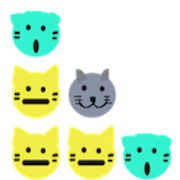
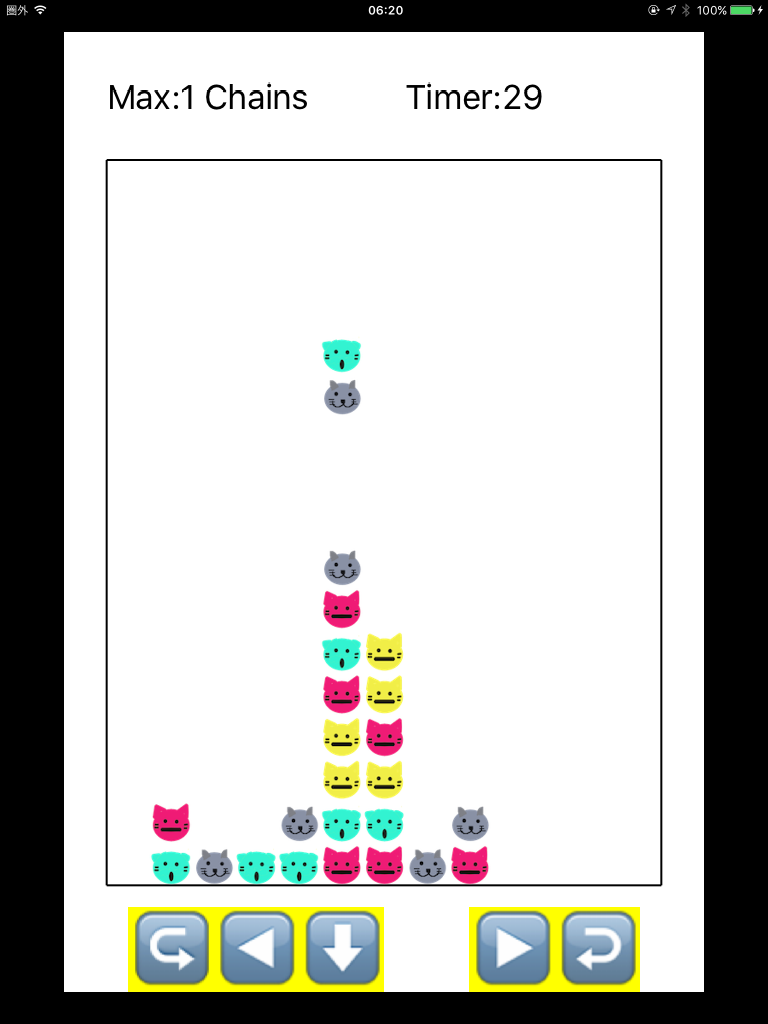
まあとりあえず、3つか4つ、縦か横に同じ色揃えたら消えて、上から空いたところにキャラクターが落ちてきて、それでまた3つか4つ揃ったらまた消えて、の連鎖が実現できたので、とりあえずこれでこのプログラムは完成ということで。
当初は、通常0.8秒の速度で落ちてきて、一旦その落ちるタイマーを止めて、消えたり連鎖のなったりの際には別のタイマーを用意して1回ずつ消えるようなアニメーションを作るとかやろうとしたのですが、全然うまくいかずに、消えた後の画面が出てくるだけでその途中経過がスキップされてしまうから、どうやったらあの1回ずつ雪崩式に連鎖が起きるアニメーションを作れるのか思案してました。
sleepとかUIView.animateWithDurationとか使ってもぜんぜん途中のアニメーションが表示されなかったし。
しょうがないので、faseFlagというフラグようの変数を用意して、タイマーは一個のみ。
通常は上から落ちてきて、その他のキャラクターに重なったらフラグを1にして3つか4つ揃ったかの確認作業。
もし揃ってたらフラグを2にして、消えるアニメーションを行う。で、また上から空いたところにキャラが落ちてきて。
それが終わったらフラグを1にしてまたキャラが揃っているかの確認。
全部終わればまたフラグを0に戻すみたいにしてみたらうまくいきました。
いろいろ学んだのは、今までタイマーをやたら増やしていたような気がするのですが、こうやってフラグを使えば実はタイマーは少なくて済みそうな気がしてきたので、次に活かしたいです。
    func update() {
        if faseFlag == 0{
            if (yPos < 19 && yPos2 < 19) && (cells[xPos2][yPos2+1] == 0 || cells[xPos][yPos+1] == 0) {
                if yPos > yPos2{
                    if  cells[xPos][yPos+1] == 0 {
                        moveD()
                    }else{
                        endD()
                    }
                }else if yPos2 > yPos {
                    if cells[xPos2][yPos2+1] == 0 {
                        print("yPos2=\(yPos2),cells[xPos2][yPos2]=\(cells[xPos2][yPos2])")
                        moveD()
                    }else{
                        endD()
                    }
                }else {
                    if cells[xPos][yPos+1] == 0 && cells[xPos2][yPos2+1] == 0 {
                        moveD()
                    }else{
                        endD()
                    }
                }
            }else {
                endD()
            }
        }else if faseFlag == 1{

            dropCount = 0
            iLoop:for i in 0...13 {
                jLoop:for j in 0...18 {
                    if cells[i][j] != 0 && cells[i][j+1] == 0{
                        print("faseFlag=\(faseFlag)")
                        dropTmpX = i
                        dropTmpY = j
                        dropCount++

                        updateDrop()
                        break iLoop
                    }
                }
            }
            print(dropCount)
            if dropCount == 0 {
                faseFlag = 2
            }
        }else if faseFlag == 2 {
            clear()
        }else if faseFlag == 3{
            print("end")
            timer.invalidate()
            if cells[6][4] == 0{
                timer = NSTimer.scheduledTimerWithTimeInterval(0.8, target: self, selector: Selector("update"), userInfo: nil, repeats: true)
                print("end2")
            }
            startD()
        }

    }