【Swift】UIImageViewで画像を複数読み込んで自動的に動かしつつ、ドラッグアンドドロップを可能にする。
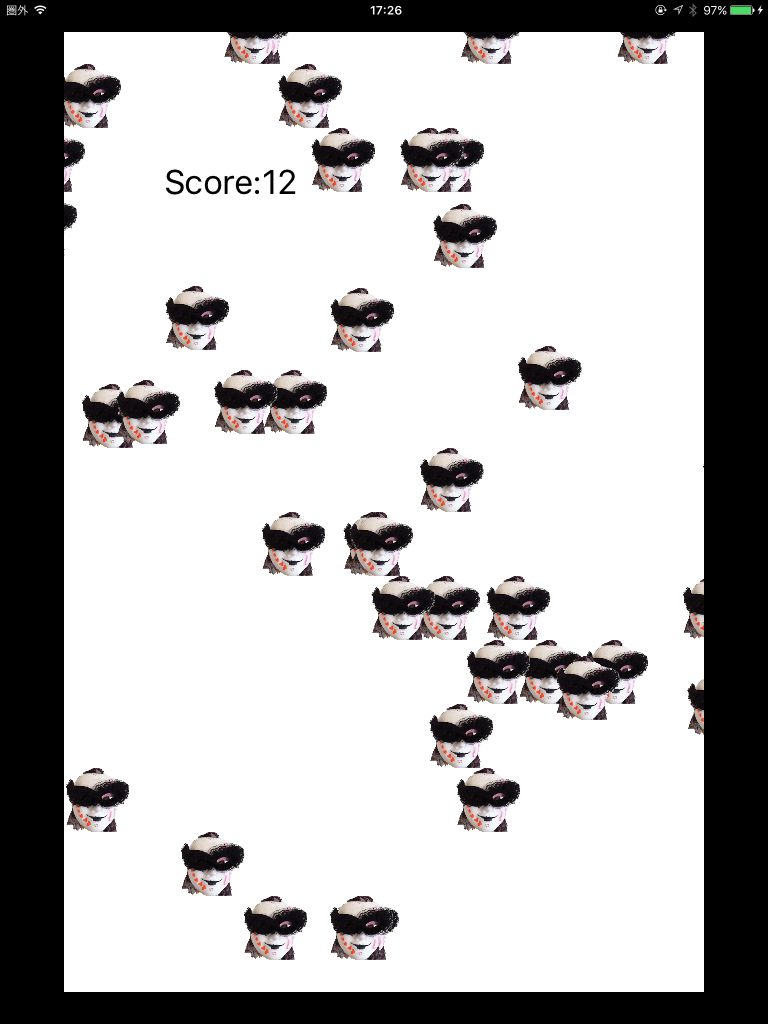
UIImageViewで画像を複数読み込んで自動的に動かしつつ、ドラッグアンドドロップを可能にして遊ぶというプログラムを作りました。
タイマーとUIImageViewでのタグの設定と、タッチした画像のドラッグアンドドロップの話です。
最後にコード全文が来ますが、途中のコツなどを説明します。
(途中でラベル2とか出てきますが、今後発展させる上で別ラベル表示が必要なのであえて残しているだけです。)
まずこれ。
var updateTag = [Bool](count: 40, repeatedValue: true)//40個のタグを宣言
複数のイメージファイルを使う上で、普通は配列とか辞書とかを使いそうになりますが、UIImageViewでは各viewにタグが設定できるので、使う予定の画像数40個分のラベル配列を確保です。
タグをbool型にして、trueだったら画像の右から左への動きを止める、falseだったら画像の動きを止めない、という役割をもたせています。
imageMask.tag = i + 1
for文で画面上にランダムな場所にマスク画像を設置するとともに、その画像にタグを設定してます。
なお、ビュータグが0となると、元々の画面のビュータグ0とかぶって不具合が出ると思うので、タグの初期値が1から始まるようにしています。
override func touchesBegan(touches: Set<UITouch>, withEvent event: UIEvent?){}
単にドラッグアンドドロップの機能だけを意図しているのであれば、タッチ開始時に特に何もする必要はないのですが、画像をタップしている間にマスク画像が左に流れていってしまい、指でタップしている間に保持することができなくなります。
なので、このタッチされた時に、updateTagをfalseにします。
そうすると、右から左に動く動作がその画像に関してのみ止まります。
で、指を離すと再びtrueにする。
こうすれば、指で画像を押さえつけている雰囲気が出ますし、ドラッグ中に指から画像が逃げてしまうこともありません。
imageMask.frame.origin.x -= CGFloat(i)*0.07
update関数のところですが、各画像ごとに右からひだりへのスライド速度を変えたほうが面白いと思って、こういう式入れています。
まあ説明はテキトーですがこんなところで。
これを発展させて一つゲームを作ってアプリ申請してみようと思います。
import UIKit

class ViewController: UIViewController {
    let label1 = UILabel() //score
    //let label2 = UILabel()

    var updateTag = [Bool](count: 40, repeatedValue: true)//40個のタグを宣言
    var score: Int = 0
    let screenSize: CGSize = UIScreen.mainScreen().bounds.size//画面全体のサイズを取得


    override func viewDidLoad() {
        super.viewDidLoad()
        // Do any additional setup after loading the view, typically from a nib.
        self.setTimer()

        //画像
        for i in 0...39 {

            let imageMask: UIImageView = UIImageView()
            imageMask.image = UIImage(named: "mask.png")
            imageMask.frame = CGRectMake(0, 0, 32, 32)
            imageMask.center = CGPointMake(CGFloat(arc4random())%screenSize.width, CGFloat(arc4random())%screenSize.height)

            imageMask.userInteractionEnabled = true

            imageMask.tag = i + 1

            self.view.addSubview(imageMask)
        }


        //ラベル
        label1.frame = CGRectMake(50, 50, 100, 50)
        //label2.frame = CGRectMake(50, 100, 100, 50)

        label1.text = "Score:\(score)"
        //label2.text = "y:\(imageMask.frame.origin.y)"

        self.view.addSubview(label1)
        //self.view.addSubview(label2)


    }

    override func touchesBegan(touches: Set<UITouch>, withEvent event: UIEvent?) {

        for i in 0...39 {
            let imageMask: UIImageView = self.view.viewWithTag(i+1) as! UIImageView
            let touch: AnyObject = touches.first!
            let oldDx = touch.previousLocationInView(self.view).x
            let oldDy = touch.previousLocationInView(self.view).y

            if (imageMask.frame.origin.x <= oldDx)&&(oldDx <= (imageMask.frame.origin.x + imageMask.frame.width)){
                if (imageMask.frame.origin.y <= oldDy)&&(oldDy <= (imageMask.frame.origin.y + imageMask.frame.height)) {
                    updateTag[i] = false
                }
            }
        }
    }

    override func touchesMoved(touches: Set<UITouch>, withEvent event: UIEvent?) {


        for i in 0...39 {
            let imageMask: UIImageView = self.view.viewWithTag(i+1) as! UIImageView

            let touch: AnyObject = touches.first!

            let oldDx = touch.previousLocationInView(self.view).x
            let oldDy = touch.previousLocationInView(self.view).y

            if (imageMask.frame.origin.x <= oldDx)&&(oldDx <= (imageMask.frame.origin.x + imageMask.frame.width)){
                if (imageMask.frame.origin.y <= oldDy)&&(oldDy <= (imageMask.frame.origin.y + imageMask.frame.height)) {


                    let newDx = touch.locationInView(self.view).x
                    let newDy = touch.locationInView(self.view).y

                    let dx = newDx - oldDx
                    let dy = newDy - oldDy

                    var viewFrame :CGRect = imageMask.frame

                    viewFrame.origin.x += dx
                    viewFrame.origin.y += dy

                    imageMask.frame = viewFrame

                    self.view.addSubview(imageMask)

                }

            }
        }
    }

    override func touchesEnded(touches: Set<UITouch>, withEvent event: UIEvent?) {

        for i in 0...39 {
            let imageMask: UIImageView = self.view.viewWithTag(i+1) as! UIImageView

            let touch: AnyObject = touches.first!

            let oldDx = touch.previousLocationInView(self.view).x
            let oldDy = touch.previousLocationInView(self.view).y

            if (imageMask.frame.origin.x <= oldDx)&&(oldDx <= (imageMask.frame.origin.x + imageMask.frame.width)){
                if (imageMask.frame.origin.y <= oldDy)&&(oldDy <= (imageMask.frame.origin.y + imageMask.frame.height)) {
                    updateTag[i] = true
                    score += 1
                    label1.text = "Score:\(score)"
                }
            }
        }
    }

    //タイマー
    func setTimer(){
        _ = NSTimer.scheduledTimerWithTimeInterval(0.01, target: self, selector: Selector("update"), userInfo: nil, repeats: true)
    }

    func update(){
        for i in 0...39 {
            if updateTag[i] == true {
                let imageMask: UIImageView = self.view.viewWithTag(i+1) as! UIImageView
                imageMask.frame.origin.x -= CGFloat(i)*0.07
                if (imageMask.frame.origin.x + imageMask.frame.width < 0) {
                    imageMask.frame.origin.x = screenSize.width
                }
            }
        }
    }

    override func didReceiveMemoryWarning() {
        super.didReceiveMemoryWarning()
        // Dispose of any resources that can be recreated.
    }
}